Showing posts with label open source. Show all posts

Friday, June 18, 2010

Symfony Form widgets for many-to-many relationship: a new widget implementation - part II

Following part I, here is the final step to code a new symfony form widget in order to improve a many-to-many relationship. After discussing the best UI possible for a many-to-many relationship, we are now going to look how to code it as a symfony widget. I would not pretend it is the best solution, but I believe it is clean enough to be used and it definitively works!

One of the comment point me to the following approach: http://www.ryancramer.com/journal/entries/select_multiple/. It is also an elegant way to do it, unfortunately it does not work for me since my list of available object is extremely long, therefore a select is again not a good approach. Don't get me wrong, my approach is not necessarily the best but it fits a specific user case.

Before starting you can have a look at a demo of what we will get at the end. Here is a video to show the different interactions.

Pre-requisite:

  • symfony 1.3/1.4
  • jQuery 1.4+ and jQuery UI 1.8+. This might seems overkilling for a simple widget but most of the time you are using these 2 libraries in your project already. In jQuery UI you specifically need for this widget the new autocomplete widget.

Ok, no more talk, let's go to the code! You can find it as a gist at http://gist.github.com/443124. Feel free to clone, improve and share! This code need some refactoring for sure but I did not have time yet and many people where asking for it. Feel free to improve it and share it ;-)

Stay tuned, we will publish some new widgets in the coming months...

Thursday, March 18, 2010

Symfony Form widget for many-to-many relationship: UI considerations - part I

This 2 parts tutorial will show you how we came up with a new symfony sfForm widget to handle many-to-many relationships. In our specific case, existing widgets for such relationships were found extremely unuser-friendly to say the least, we had to think about a new widget to help our users in their daily operation.
We do not pretend that our solution is the best in all user-cases but it is definitively a better approach when you have a lot of potential items to associate with your current object and a short list of associated items; the relationship between a classroom and students for example: you have a class of students (the class is less than 40 students usually) within a University of thousands of students.

The default widget

I have always been very skeptical with the default widget in symfony form framework for many-to-many relationship. In a UI perspective it was really bad:
  • You have to "shift-click" in a multiple select box the item you want to add to your relation,
  • if you have a long list, it is very inconvenient to find the one you want,
  • if by mistake you click without the shift button pressed, you are good to start over your multiple selection

I guess you can see the picture ;-) Talking about the picture, here is one to show you what I am talking about.

Screen shot 2010-03-17 at 2.28.27 PM.png

The double list widget

When you start to look around for a better replacement, you obviously find the plugin sfFormExtraPlugin which includes the widget called sfWidgetFormSelectDoubleList and you get something like this:

Screen shot 2010-03-17 at 2.23.40 PM.png


This is already a big improvement but still has some huge limitation when you are dealing with big lists (I am thinking here stuff like list of students in a University). You do not want to have a select box with thousands of options: 1) it is going to slow down your page and 2) it is not easy to search inside.

A double list enhancement

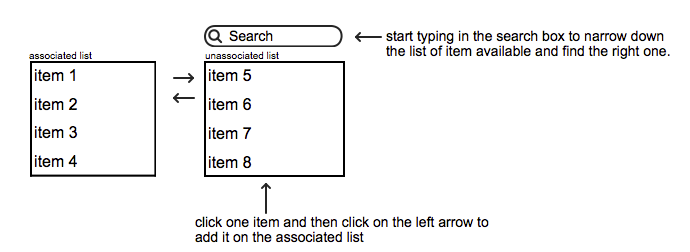
The first "natural" step could be to improve an existing widget. In our case, the best is so far the double list widget mentioned earlier. An easy way to improve it could be to add a search box on top of the unassociated select in order to easily narrow down the list and find what we are looking for. We could even imagine a similar search box on top of the associated list to add a little bit more flexibility too. Anyway, here is a mockup that explains all this:

Screen shot 2010-03-18 at 10.26.47 AM.png

This could be already a huge improvement, although I can see still some limitations, namely: 1) you still load a huge list of unassociated items, 2) when you start filtering with your search, you need to select the desired item and then click on the left arrow, this is a bit too much interaction.

Anyway such a widget would be a huge improvement already and could be used in many cases, but let's not stop here...

Thinking forward

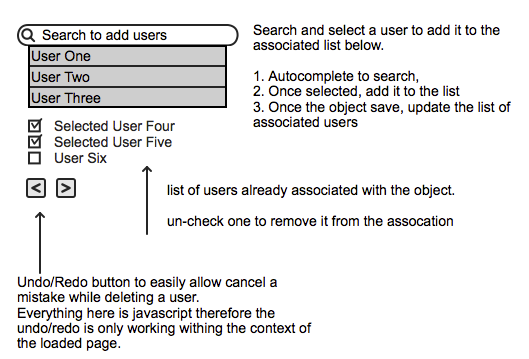
We came up with a mockup that suits our needs. I acknowledge that it cannot fit all needs, it is good to list a short list of relations -usually list of student in a class is under 40 and add new students among a huge list.

many to many relationship widget on steroid

You basically search in an autocomplete box (ajaxified) to find the item you want to add, click the right one in the list and it is added to your checked list below. The all list is saved once you save the current form object. If you uncheck one item it will be removed from the list (with some delay to allow you to change your mind in case of a mistake). Finally we could add a local undo/redo function in case of mistake.

In terms of interaction, you type in your searched word, select from the list (click or enter) and you are ready to add another. I believe it can help a lot end users.
This symfony widget does not exist as far as I know therefore next part of this tutorial will focus on the code to make it a reality.

Conclusion

The first thing I'd like to claim: "multiple select" is BAD! At least I could not find a user-case where it could be a good solution, therefore avoid it as much as you can.


Thursday, January 21, 2010

a new version for sfAdminThemejRollerPlugin 0.2

Finally! We finally managed to catch up and prepare a new version of our Symfony plugin to generate nice admin generator based on jQuery UI Themes.

We tagged this version as 0.2.0 since we still consider this plugin as beta version (but usable on production) but the big news is the support of symfony 1.4! For this specific support I must thank you 2 people that submited 2 patches to make this compatibility possible. Thanks to ( jtexier , "merci Jerome ;-)") and dalexandre and of course I must named jeremyb for his dedication to the project, he did most of the latest development.

I also setup a live demo to allow you to play a little bit with the plugin. It is currently basic but we will add more stuff step by step.

What's new:
  • Theme switcher integrated
  • user interface fixes and enhancements
  • Symfony 1.4 compatibility

You can have some more details on my previous post.

The plugin is available as usual on github, I published as well the packaged plugin on symfony website.

jroller-v0.2-list.png


jroller-v0.2-filter.png


jroller-v0.2-listbottom.png


Screen shot 2010-01-21 at 10.48.44 AM.png

Wednesday, November 11, 2009

SfGuardUser sync with Google Apps

As I am working for a university, we have recently migrate all our staff to use Google Apps for Education and we plan to move all our students and alumni too later this year. Google Apps for Education is really a great tool (and free for us ;-), most of our users are really happy of the switch: it is reliable, fast and have so many collaborative features. Bye bye Outlook :-(, welcome to the Cloud :-)
The Education package is the same as the Business package, including API and a lot of good stuff. The online Google Apps tools to manage users and groups is easy and simple but quickly become too simple to use when you are dealing with thousands of users, you then need to develop your own tool to maximize your daily operation. The "official" PHP5 Google Apps library is GData from the Zend Framework, which make it a breeze to integrate it with Symfony.

a view of an admin generator with Google Apps account management (using sfAdminThemejRollerPlugin):
googleapps-symfonyadmingen-integration.png


We are currently redeveloping our University Management System based on Symfony 1.2 and we plan to integrate most of our applications with symfony too, including a research project on a new social learning platform.

I developed a Symfony task (sf1.2+Doctrine) that take a csv file and create your local sfGuardUser as well as the corresponding Google apps accounts. The Google accounts creation is optional so the task can be used for a normal batch user creation with Symfony alone. A simple:

./symfony guard:batch-create-user your.csv --googleapps=yourdomain.com

...will do the trick for you! I am not sure whether publishing the source code might be interesting for others (the Google API is only available for Premier and Education customers)...let me know. We will eventually publish our University management system as an open source project later for sure.

Here is a list of issues and recommendations while dealing with Google Apps Provisioning API:

  • Google Apps API error reporting: when you have an error while dealing with Google Apps API, errors messages are useless, you always get a 'server errors' message without more details, it is then very difficult to debug your code to find the issue.
  • Don't forget some of the basic Google Apps rules for account creation such as a password with minimum 6 characters otherwise you get back one of those unmeaning-full error message.
  • sfGuard is using sha1 as the default encryption method but it adds a grain of 'salt' on it therefore you cannot send to Google Apps the correct sha1 password. I had to overwrite the default setPassword() and checkPassword() to simply remove the use of the salt and make sure my password synchronization with Google Apps can work. I am not sure if it is a huge security concern though, any idea? Beside this you can also use md5 for your password but you will not be able to use another algorithm since Google Apps is only accepting sha1 and md5.


Monday, November 9, 2009

what's up on sfAdminThemejRollerPlugin?

I finally found some time to add new stuff on the unpronounceable plugin, and thanks to some new contributors more are to come (thanks JeremyB ;-). Here is the list of change:

  • As I mentioned in my previous post, I add a new config field named 'show' for the admin generator. I guess the meaning of this new option is quite obvious, isn't it? It adds the possibility to simply view one object details without editing it. It currently shows the list of fields like it is for the 'edit' view, meaning with a tab interface.
    jroller-list-showbutton.png
  • UI improvements (done by jeremyb): as you can see in the 2 screenshots below there are many improvements such as the new 'reset' button next to the filter button, the sort arrows, new css styles for object actions, new pager view and finally the batch action select box is now also supporting the theme roller


The top part looks like this:
sfAdminThemejRoller-20091109-1.png

  • notice the new 'reset' button next to 'filters'

  • the up and down arrow on the table column names

  • the new css style for the object actions


...and the bottom part (new paginator and the select box is also styled according to your roller theme):
sfAdminThemejRoller-20091109-2.png


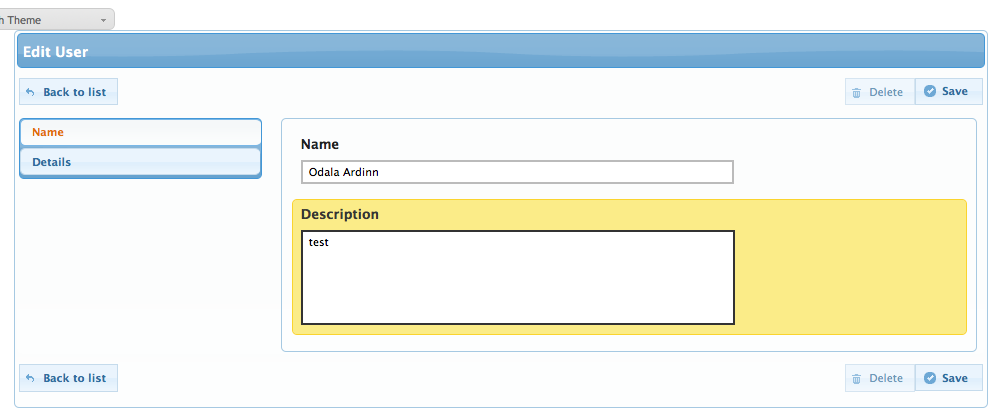
the edit view (buttons are accessible both on top and button of the form, tabs are now vertical):
sfAdminThemejRoller-20091109-3.png


The current code is available in github only. It is not yet ready for a new plugin release, we are still missing some key elements.


Saturday, September 5, 2009

new version of sfAdminThemejRollerPlugin (v 0.1.4)

I have finally released a new version of this plugin with an unpronounceable name ;-) Here is the list of change:

  • I add a new field named 'show' for the admin generator. I guess the meaning of this new option is quite obvious, isn't it? It add the possibility to simply view one object details without editing it. It currently shows the list of fields like it is for the 'edit' view, meaning with a tab interface.

  • I also create a new class jRollerDoctrineGenerator to replace sfDoctrineGenerator if you want the default link (the one you create with the = sign before the field name in the generator.yml) to link to the 'show' view rather than by default going to the 'edit' view. So far this is the only added value of this class. Of course if you prefer to keep the link to the 'edit' view simply keep the default class sfDoctrineGenerator. To use it, you simply need to modify your generator.yml as followed:


generator:
class: jRollerDoctrineGenerator
params:
theme: jroller
....


The source code is available on github for the moment, I want to finalize a few things before packaging a new plugin version. I also need to put the source code on svn.

jroller-list-showbutton.png

Friday, August 28, 2009

Propel ORM is dying?

as we used to say in French: "Propel is dead, long live Doctrine!". Indeed it seems that Propel development as slow down to a point where the lead developer quit the project (see his post). Guys, there are no more excuse to not look at Doctrine for all your Symfony project (and more).

New version for the symfony jRoller admin theme

I have just released the version 0.1.3 of the symfony plugin named (take a deep breath ;-) "sfAdminThemejRollerPlugin". I fixed a few inconsistency and allow to change to your own theme without the need to install your own version of jQuery and jQuery UI. Within the plugin there is only one theme named "redmond" (what a bad idea to name a theme like this :-( but you can download one from jqueryui.com and install it on your own web directory (see README file).
I have also uploaded it to github.com and to the official symfony svn repository.
Taste it and enjoy it!

jroller-flickr-menu.png

Monday, August 24, 2009

sfAdminThemejRollerPlugin: Symfony admin generator on steroid

It's been a while since I wanted to work on my own admin generator theme. In symfony 1.0 the default admin generator was not really nice, it became a little bit better in 1.2 but still not to my taste (purely subjective I must admit ;-). For example, one thing get me mad is the css for the table list and the filter, I believe that the table list should be maximized and filters available only when we need them.
I spent quite some time to modify some admin generator in some projects but you always end up doing the same thing over and over (see this screenshot of what I have done with the list view based on a standard admin generator)...it was time to make things more to my taste. I now have a pretty clear idea of things that I would like out of the box from my new admin generator. Let me be more specific with the complete list of things I would like:

  1. Change css style to a more modern style (again purely subjective ;-) that can be changed easily. For this I am using jQuery UI with their new theme roller system. The plugin is packaged with only one theme but it is extremely (too?) easy to change to your favorite theme (long term will be to use the upcoming html5 grid).

  2. The filter box is hidden by default with a button to show/hide a modal window with the list of available filters. This allows to have a larger space for the table list.

  3. In the new/edit views fieldsets are replaced by tabs (again jQuery UI).

  4. Add a show only view, it makes sense for some application to allow read-only access.

  5. filters ala iTunes smart playlist, meaning you select fields you want to filter and add them (nice to have but not so important, although useful if you have a lot of filter options)

  6. Print preview (configuration in generator.yml): simply a non paginated table easy to print with sortable column (javascript grid style)

  7. live search (configuration in generator.yml): be able to quickly filter the table list while typing a few characters, ajax style. I did that before for one specific module, I now have to make it part of the admin generator.

  8. export to CSV format: we could have a modal window to select the fields we would like to get and export them or simply a list defined in the generator.yml (which can include getters that are not database fields).

  9. export to PDF: does it make sense at all, I am not yet sure!

  10. Import CSV to database: to be able to simply upload a csv file of data to import through the admin generator.


The first 3 items are easy to do just by modifying existing admin generator templates and are indeed already packaged in the plugin. The rest need more work (still learning how admin generator are working deeply).

I am also trying as much as possible to keep all actions accessible without javascript and make sure that I do not break any default admin generator css classes and ids in case you need them.

"Stop talking and show us the code"...here you go! It is published as a symfony plugin at http://www.symfony-project.com/plugins/sfAdminThemejRollerPlugin, meanwhile here are some screenshots:
jroller-list-themes.png

jroller-list-filters.png

jroller-form.png


How to install?


./symfony plugin:install sfAdminThemejRollerPlugin --stability=beta

When I say beta, it is beta ;-) I am not fully satisfied with the code and still thinking about the best approach for some features (not mentioning it's my first play with admin generator). Feel free to give me feedback.
I will publish the code on github later to ease collaboration if any of you are interested. Anyway, it's php right? so you can play with the code right now!

How to use it?


./symfony --theme=jroller doctrine:generate-admin


or if you have an existing admin generator, simply modify your generator.yml file with
theme: jroller
instead of theme: admin.

Configuration


I currently package jQuery 1.3.2 and jQuery UI 1.7.2 to make sure it can work out-of-the-box, but it is also easy to specify in your app.yml file that you do not want to use those versions (or because you already include those libraries in your project) and include your own jquery and UI.
jQuery UI is using at the minimum: Tabs, Dialog (Drag and drop and resizable recommended).


# inside your app.yml file
sf_admin_theme_jroller_plugin:
web_dir: /sfAdminThemejRollerPlugin # specify specific folder where to pick your jquery stuff, ui and themes.
use_jquery: true # default. use the packaged jquery/UI
theme: redmond # default.
css_reset: true # default. reset default css (from Blueprint CSS)


What's next?


I will try to implement the rest in the coming months (I just found out that sfDoctrineAdminGeneratorWithShowPlugin start to implement some of my ideas), again feel free to contribute to speed up the process.

Bugs? no way!


  • I still have a pixel problem with the caption and tfoot of my table, if anyone knows how to solve it?


You will probably find bugs, please report them.

Friday, August 14, 2009

Symfony batch and i18n + pdf generation

A few months ago, I wrote a post about i18n in batch and pdf generation. At that time I could not find a way to manage translation in symfony batch (for example when you need to send email to customers, etc...). In Symfony 1.2, batches are depreciated in favor of tasks but my project is still in symfony 1.0 (and I guess the same can be applicable in 1.2). Anyway, I finally found a way to do it:
sfLoader::loadHelpers('I18N');
$I18N = sfContext::getInstance()->getI18N();
$I18N->setMessageSourceDir(SF_ROOT_DIR.DIRECTORY_SEPARATOR.SF_APP.DIRECTORY_SEPARATOR.'i18n', $culture);
echo __('text to translate');

I am not sure if it is the best solution, but it definitively works.

On the pdf side, I was mentioning that in order to generate invoices in pdf, I created some pdf invoice templates with Open Office Draw. Following this step, I was able with Zend_Pdf to generate PDF files on the fly based on my templates. The big problem with this solution is that you have to positionned all your text at the pixel and cannot manage things like multiple lines text and so on. You end up writing a lot of stupid code and anything you want to modify you have to try again and make sure it works (and when you manage several languages it can even be more complex). Anyway I managed to do it like this for the billing system used in East-Timor but I always wanted another solution. I did find some promising project but nothing yet reach a usable state to my knowledge. However, I found to interesting projects:

  • odtPHP: it is not as such a pdf generator but it looks fantastic to generate open documents easily with a templating system. It is great and I am sure I will use it soon. Once you have an open document, it is a piece of cake for anybody to save it as pdf...even my grandma could do this ;-)

  • Podr: it's a kind of open office server to generate document on the server, including pdf. However it seems only working on windows and quite heavy installation, I am not sure if it is a good solution. Anyone using it?


odtPHP looks like a clean and nice php class and it should be easy to integrate in symfony. On the client side, if you do not have open office (or any odt compatible solution) you can simply install a plugin for Microsoft Office to support open document formats (it seems it is even native support in Office 2007 service pack 2): http://www.sun.com/software/star/odf_plugin/ or http://sourceforge.net/projects/odf-converter/.

Wednesday, August 12, 2009

A Mac tool for MySQL: Sequel Pro 0.9.6

In the past month or so I have been using SequelPro (http://sequelpro.com/) for my local MySQL usage. At that time it was version 0.9.5 and it was quite interesting for local usage, however it was still missing quite a bit of information compare to a tool like phpMyAdmin and one big limitation (at least for me) was the connection type used: only on the MySQL port. There was no way yet to establish a SSH connection to connect to remote databases. Most of the time a goog MySQL server should not accept external connection, therefore a ssh tunnel is the only solution for such cases when you want to use desktop app.

Fear not anymore! Version 0.9.6 has been released and I must admit it is a huge improvement regardless of the limited increment on the version number. It has ssh support and much much more. I can now connect to all my databases servers around the world easily through only one interface. On top of the ssh connection they add support for foreign key, add new view such as 'Relations' and 'Table info' and history of your actions. This is certainly now the tool I am going to use, even more than phpMyAdmin.

sequelpro096.png

Thursday, January 15, 2009

My view on CMS - the backend, part 1

CMS is a complex topic, everybody is talking about this and everybody has a different approach. I don't want to give my own concept here (should I have one ;-) but simply have a practical approach based on a project we have to do for one of our customer (largest casino in the world...). We did the first version of its CMS based on a typical Symfony 1.0/Propel/MySQL5.

We are now in the process to re-write the all application to make it useful for further projects and customers and optimize things based on our small experience. We decided to make the "big sf jump": symfony 1.2/Doctrine! It is not an easy choice since we did not have yet any experience neither with symfony 1.2 nor doctrine but we believed it was worth to make the jump specially due to the new admin generator and the form framework, not mentioning all the goodies from doctrine itself.

When you build a CMS, it is quite common to think first about the backend that will allow your customer to manage its content in an more-or-less easy to use interface. This interface is a key for a CMS success (along with its flexibility and extensibility). On my course to draw the backend interface I've tried to pick the best patterns (at least to me) from SPIP (a french CMS), Joomla and Wordpress. Thanks to Balsamic, I quickly draw what would be our CMS backend, at least for page management (the central part of the cms). See below for mockups.

List of pages

The list of pages should use symfony admin generator to keep its flexibility, therefore there is a lot of work on css and javascript fronts. A few things will become ajax (I will publish later my 2 cents jquery plugin to ajaxified a symfony admin generator list): pagination and the new live search.

For the list of filters, I wanted to make them less obstrusive, with some ideas from Google Docs search options (show and hide them) as well as Apple iTunes smartlist configuration. The latest will be a little bit more tricky to do...probably not for version 1!

For the need of a CMS we add the following elements to the default admin generator:
  • Live search will "ajaxly" filter the list according to a search on title and content of the page.
  • New batch actions such as "copy" and "move" pages.
  • A left sidebar to navigate in a tree way (based on nested set). This navigation will filter the table in the same way as live search (ajax as well).
As we use Doctrine, we will use of lot of out-of-the-box behaviors: Nested set, versioning, i18n and of course Timestampable.

Next step we will look at the page edition view...see you there!

Tuesday, January 13, 2009

Finally, bats can use Firefox ;-)

Mozilla Labs is a team of guys building the future of the web. They are doing a lot of amazing work (most of it only alpha or beta for time being) and open doors for radically new ways for our future interactions with the web. They have been working on Weave, Ubiquity or Prism. I really like those projects and want to use them in the future.

Here is a video to show how to make Firefox accessible for bats.


Ubiquity Tutorial: Turn a page upside-down from Aza Raskin on Vimeo.

Of course, it is useless for humans (except...Batman ;-) but it shows the power of this kind of technology.

Saturday, November 15, 2008

Firefox 3 rocks

No, it's not new! But I realized not long ago that I do not use anymore Safari on my Mac. The integration with MacOS is now really good, not petfect though: I am still missing integration with Keychain (Mac password manager). I wish also a simple way to sync bookmarks between Safari and Firefox since we will not get Firefox on iphone any time soon.
The 2 most useful new features for me as a user are:
- The new "awesome bar", it changes the way I search my bookmarks and history
- Tags on bookmarks: I don't organize my bookmarks into folders, I just mark them with relevant tags, it's much more convenient.
And more is to come on the upcoming 3.1...

-- Post From My iPhone